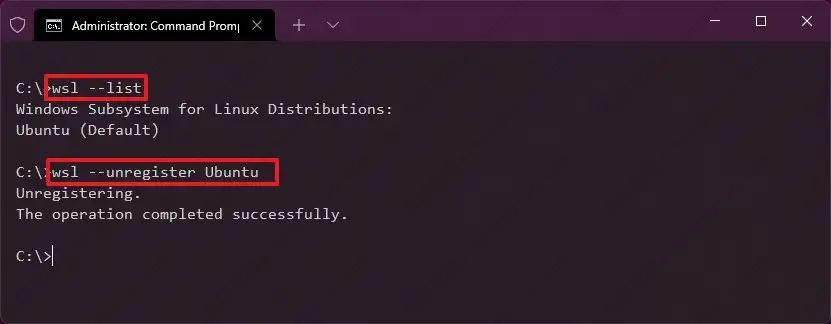
Powershell中 wsl -l 命令展示所有wsl里安装的发行版
wsl –unregister 发行版名称 如 wsl –unregister Ubuntu
个人使用请勿留言
Powershell中 wsl -l 命令展示所有wsl里安装的发行版
wsl –unregister 发行版名称 如 wsl –unregister Ubuntu
Jason Nano 使用zram管理Swap
/etc/systemd/nvzramconfig.sh
中间有一行
mem=$(((“${totalmem}” / 2 / “${NRDEVICES}”) * 1024))/2 就是整体缩小一半,意思是总 zram = RAM 的 50%,仍然平均分到每个 zram 设备
改为 mem=$(((“${totalmem}” / “${NRDEVICES}”) * 1024)) 就是保持Swap容量与内存大小一致
Jason Nano 也是使用LVM管理磁盘
https://nginx.org/en/linux_packages.html#Ubuntu
Install the prerequisites:
sudo apt install curl gnupg2 ca-certificates lsb-release ubuntu-keyring
Import an official nginx signing key so apt could verify the packages authenticity. Fetch the key:
curl https://nginx.org/keys/nginx_signing.key | gpg --dearmor \
    | sudo tee /usr/share/keyrings/nginx-archive-keyring.gpg >/dev/null
Verify that the downloaded file contains the proper key:
gpg --dry-run --quiet --no-keyring --import --import-options import-show /usr/share/keyrings/nginx-archive-keyring.gpg
To set up the apt repository for stable nginx packages, run the following command:
echo "deb [signed-by=/usr/share/keyrings/nginx-archive-keyring.gpg] \
https://nginx.org/packages/ubuntu `lsb_release -cs` nginx" \
    | sudo tee /etc/apt/sources.list.d/nginx.list
If you would like to use mainline nginx packages, run the following command instead:
echo "deb [signed-by=/usr/share/keyrings/nginx-archive-keyring.gpg] \
https://nginx.org/packages/mainline/ubuntu `lsb_release -cs` nginx" \
    | sudo tee /etc/apt/sources.list.d/nginx.list
Set up repository pinning to prefer our packages over distribution-provided ones:
echo -e "Package: *\nPin: origin nginx.org\nPin: release o=nginx\nPin-Priority: 900\n" \
    | sudo tee /etc/apt/preferences.d/99nginx
To install nginx, run the following commands:
sudo apt update
sudo apt install nginx
curl -fsSL https://deb.nodesource.com/setup_24.x | sudo -E bash
apt list nodejs
apt install -y nodejs
node -v
npm -v
npm install -g openclaw@latest
openclaw onboard –install-daemon
The fastest way to install. It detects your OS, installs Node if needed, installs OpenClaw, and launches onboarding.
bashCopy code
curl -fsSL https://openclaw.ai/install.sh | bashpowershellCopy code
iwr -useb https://openclaw.ai/install.ps1 | iexTo install without running onboarding:
bashCopy code
curl -fsSL https://openclaw.ai/install.sh | bash -s -- --no-onboardpowershellCopy code
& ([scriptblock]::Create((iwr -useb https://openclaw.ai/install.ps1))) -NoOnboardhttps://docs.docker.com/engine/install/ubuntu
Run the following command to uninstall all conflicting packages:
sudo apt remove $(dpkg --get-selections docker.io docker-compose docker-compose-v2 docker-doc podman-docker containerd runc | cut -f1)sudo apt update
sudo apt install ca-certificates curl
sudo install -m 0755 -d /etc/apt/keyrings
sudo curl -fsSL https://download.docker.com/linux/ubuntu/gpg -o /etc/apt/keyrings/docker.asc
sudo chmod a+r /etc/apt/keyrings/docker.asc
sudo tee /etc/apt/sources.list.d/docker.sources <<EOF
Types: deb
URIs: https://download.docker.com/linux/ubuntu
Suites: $(. /etc/os-release && echo "${UBUNTU_CODENAME:-$VERSION_CODENAME}")
Components: stable
Architectures: $(dpkg --print-architecture)
Signed-By: /etc/apt/keyrings/docker.asc
EOF

sudo apt update

#sudo apt install docker-ce docker-ce-cli containerd.io docker-buildx-plugin docker-compose-plugin
sudo apt install -y docker.io docker-compose-v2 docker-buildx
systemctl enable --now docker
docker version
docker compose version
docker buildx version